يبدأ طلب إشارة لوحة جرس الإنذار بالحدث الذي يجب الإعلان عنه، وليس بصورة المنتج. اذكر مُحفِّز الإشارة، والإشارة الصوتية المقصودة، ومصدر طاقة التحكم، وسياق التركيب، ومراجعة الرسم أولاً؛ ومن ثم يمكن مقارنة وثائق المنتج المختار مع متطلبات اللوحة الواضحة.
محتويات
الجزء 1. حدد حدث الإشارة قبل اختيار الجرس
قبل أن يتم تسعير الجرس، يجب على فريق اللجنة وصف الحدث المتوقع أن يعلن عنه. يجب أن يحدد رسم التحكم المشغل، ومستلمي الإشارة، ودائرة التحكم، وما إذا كان الجرس تنبيهاً محلياً أو جزءاً من ترتيب توثيقي أوسع.
هذا الوصف أكثر قيمة من ملصق قائمة مواد قصير. فهو يسمح للمشتري بطلب سجل جهاز من المورد بناءً على متطلبات تحكم معروفة بدلاً من الاعتماد على شكل الغلاف، أو صورة المنتج، أو وظيفة مفترضة.
الجزء 2. إبقاء الإشارة المسموعة منفصلة عن وظائف التحكم
عندما يتطلب التصميم إشارة مسموعة، يكون الجرس هو عنصر الإشعار في تلك الوظيفة الموثقة. لا تزال مهام التبديل، والتغذية الراجعة، والإجراءات الوقائية، ومهام السلامة بحاجة إلى أجهزتها الخاصة الموثقة ومنطق الدوائر الخاص بها.
هذا التمييز يمنع طلب عروض الأسعار (RFQ) من مطالبة جهاز إشعار بتحمل مهام غير موثقة. استخدم وثائق المنتج المحددة وتصميم التحكم في المشروع معاً عند مراجعة اللوحة.
مهم: إن مؤشر الإنذار المسموع وحده لا يُنشئ قفل أمان ولا يؤكد أن لوحة التحكم تلبي متطلبات نظام الطوارئ المحلي. احفظ وظيفة التحكم وسجل الجهاز المحدد مرئيين في المراجعة.كتالوج مطبوعات اللجنة الكهروتقنية الدولية — سياق اختيار المستندات
الجزء 3. قارن الأدلة الكامنة وراء طلب جرس اللوحة
تصبح المراجعة أكثر وضوحاً عند فحص كل خيار مقترح مقابل نفس الأدلة. يضع هذا الجدول إطارا لنقاش مع المورد؛ وهو لا يفرض طريقة توصيل أسلاك أو هيكل إنذار كاملاً.
| مراجعة الإدخال | ما يجب على المشتري تحديده | ما يجب على المورد إرجاعه |
|---|---|---|
| حدث إشارة | الحدث أو الحالة الموضحة في رسم التحكم | تحديد المنتج المقترح لهذا الغرض |
| إمدادات التحكم | حقل الإمداد المحدد للدائرة المختارة | نشر معلومات توريد الأجهزة المحددة |
| تركيا السياق | موقع اللوحة وترتيب الأجهزة المتاحة | معلومات التثبيت والحدود المذكورة |
| مراجعة الرسم الهندسي | سجل مستخدم لتحديد واجهة التحكم | تأكيد مراجعة السجل الحالي |
| المستندات المطلوبة | الأدلة اللازمة للمقارنة التقنية | سجل المنتج والوثائق المطلوبة |
تجعل هذه المقارنة عدم اليقين واضحاً في وقت مبكر. ويمكن للموّرد بعد ذلك تحديد ما هو منشور للجهاز المقترح، بينما يحتفظ فريق اللجنة بالمسؤولية عن منطق الإشارة ومتطلبات المشروع.
الجزء 4. اربط إمداد التحكم بسجل الرسم
يجب أن تظهر إمدادات التحكم بجانب حدث الإشارة في طلب عرض الأسعار (RFQ)، إلى جانب مراجعة الرسم ومعلومات التركيب المطلوبة. إذا طلب مشروع حالة تشغيل معينة، فيجب ذكرها كمتطلبات تحتاج إلى مراجعة بدلاً من افتراضها من عائلة منتجات عامة.
| الأدلة الواجب تقديمها | لماذا يُعد ذلك مهمًا لطلب عرض الأسعار | الرد للمقارنة |
|---|---|---|
| رسم التحكم الحالي | يعرض واجهة التشغيل والتحكم | المنتج المقترح المشار إليه في الرسم |
| إمداد التحكم المحدد | يحدد حقل مراجعة للجهاز المحدد | معلومات الإمداد المنشورة للنموذج |
| الغرض من المؤشر الصوتي | يحافظ على دور مطلوب بوضوح | سجل المنتج متوافق مع الغرض المعلن |
| سياق التركيب واللوحة | يحدد أسئلة التثبيت | معلومات التثبيت المذكورة |
| طلب توثيق | ينشئ مراجعة عروض أسعار قابلة للتتبع | سجلات المنتجات المطلوبة |
للقرارات المتعلقة بالمؤشرات البصرية، راجع ما يتعلق بذلك دليل اختيار مؤشرات الإضاءة المثبتة على سكة دي آي إن. أما ملحق مفتاح الإشارة فهو مسألة مختلفة، يتم تناولها في مقال طلب عرض أسعار رحل التحويلة مقابل مفتاح الإنذار.
الجزء 5. تحويل موجز الإشارة إلى طلب عرض أسعار (RFQ) قابل للمقارنة
يجب أن يسمح طلب عرض الأسعار بمقارنة عدة ردود من الموردين دون تخمين ما تحتاج إليه اللجنة. اطلب النموذج المقترح، وسجل المنتج، والأدلة ذات الصلة بالحدث والتوريد المذكورين. قم بتسجيل الكمية وأي تنسيق للمستندات مطلوب لعملية الشراء.
| يُرجى الإدراج مع طلب تقديم القرض | ما يحلّه | رد المورد على طلب |
|---|---|---|
| مخطط إشارات الأحداث والتحكم | سياق الغرض واجهة التحكم | النموذج المقترح الذي تم تحديده بناءً على الطلب |
| الإمداد المُصرح به وسياق لوحة التحكم | الحقول التي تتطلب مراجعة الجهاز المحدد | وثائق المنتج المنشورة |
| ترتيب التركيب | أسئلة تكامل لوحة التحكم | معلومات التثبيت المذكورة |
| الكمية وتنسيق المستندات | متطلبات الإرجاع التجارية والفنية | التعرف على المنتج والسجلات المطلوبة |
| صاحب التقييم | يوضح من سيقارن الرد | رد المورد القابل للتتبع |
استخدم نطاق الأجهزة الكهربائية الطرفية لكياقوكعائلةالمنتج.ال مقال أسلاك التحكم في كونتاكتور المكيف يكون مفيداً عندما يحتاج سجل اللوحة إلى مناقشة أوضح لمسار التحكم.
الجزء 6. مراجعة صفحة جرس إنذار CHAC مع الطلب
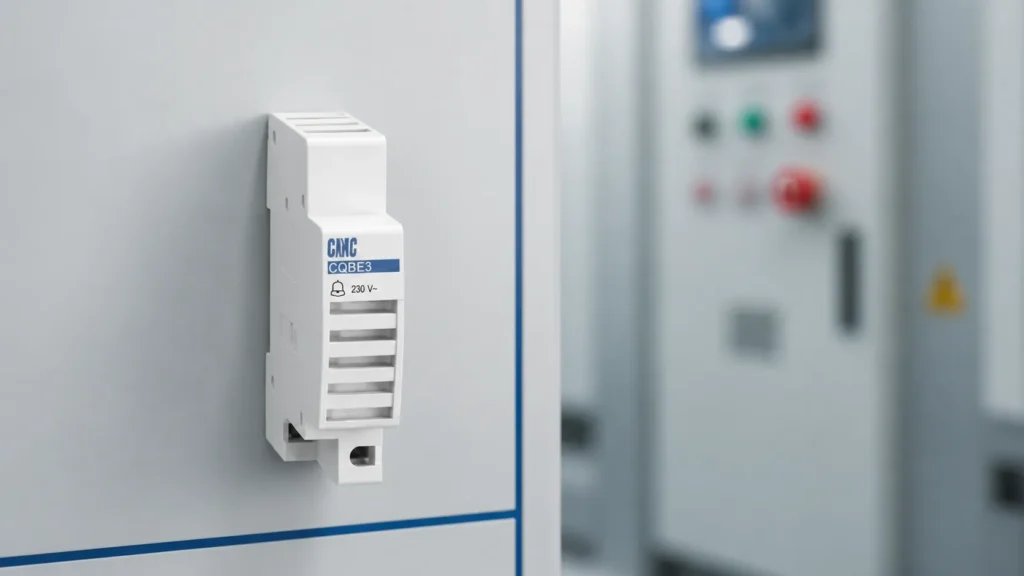
ال صفحة جرس الإنذار المعياري CQBE3 يصف علناً جرس بقوة 230 فولت تيار متردد، 50 هرتز للإشارات الصوتية للإنذار. وتُعامل تلك الحقول المنشورة نقطة بداية لمراجعة المنتج المختختار بعد أن تحدد طلبة الأسعار (RFQ) سياق الحدث، والتوريد، واللوحة؛ فهي لا تؤسس وظيفة نظام إنذار كاملة.
توصية بالمنتج
CQBE3 Alarm Bell for Industrial and Commercial Signaling | CHAC Electric
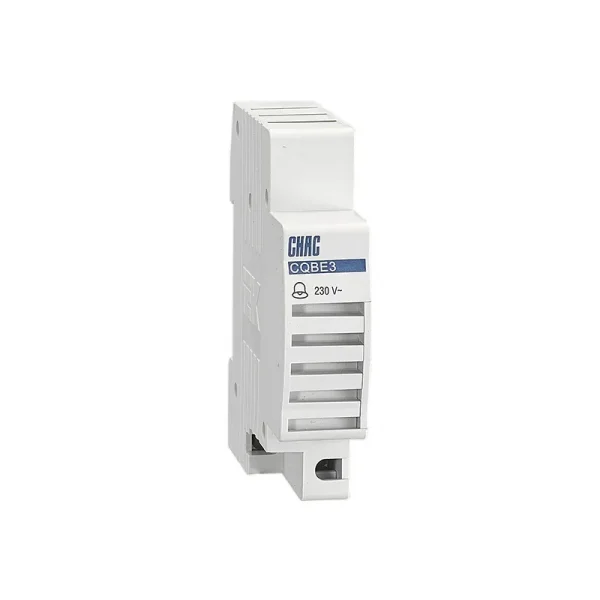
راجِع صفحة CQBE3 هذه عندما يحدد طلب عرض الأسعار (RFQ) مسبقاً مؤشر الصوت وإمداد التحكم الميداني المراد التحقق منه. لا تستبدل ملحق مفتاح أو مؤشراً مرئياً بناءً على المظهر: فكلاهما لا يؤكد الدور الصوتي المقصود أو سجل الجهاز المحدد. يمكن توجيه الطلبات التي تتضمن احتياجات العلامة التجارية أو التوثيق إلى صفحة تخصيص التوصيلات الكهربائية.
الجزء 7. حافظ على الإشارات المسموعة داخل حدود ملاءمتها
تدعم هذه المقالة التوثيق المبكر للوحة ومحادثة أكثر قابلية للمقارنة مع المورد. إنها ليست تصميماً لقفل الأمان، أو تصميماً لنظام الطوارئ، أو إجراءً للأسلاك الميدانية، أو التحقق من مستوى الصوت، أو بياناً للموافقة المحلية.
مطابقة الحدود: الاحتفاظ بالتصميم النهائي مع رسم التحكم المعتمد، ووثائق الجهاز المحدد، ومتطلبات المشروع المعمول بها، ومراجعة الهندسة المؤهلة. أرسل موجز الإشارة والسجلات المطلوبة إلى شاك إلكتريك عند طلب مناقشة منتج.
الأسئلة المتكررة
ما هو الغرض من استخدام جرس الإنذار في لوحة الكهرباء؟
يوفر إشارة مسموعة لحدث محدد بواسطة تصميم التحكم. يجب أن يوضح الرسم وثائق الجهاز المختار الدور المقصود.
ما هو الجهد الكهربائي الذي يجب أن يستخدمه جرس الإنذار؟
راجع مصدر التحكم المذكور في سجل اللوحة وثائق الطراز المحدد. لا تستنتج حقل المصدر من صورة المنتج أو حاوية مألوفة.
هل جرس الإنذار هو نفسه مفتاح الإنذار؟
لا. يوفر الجرس إشارة مسموعة، بينما يلعب ملحق المفتاح دوراً مختلفاً في التحكم أو الإشارة يجب تحديده في وثائق الدائرة.
هل يمكن اختيار جرس إنذار اللوحة من صورة المنتج؟
لا. يجب مراجعة سجلات حدث الإشارة، والتوريد، وسياق التركيب، ومراجعة الرسم، والمنتج المحدد قبل مقارنة الجهاز.
ما الذي يجب تضمينه في طلب عرض الأسعار (RFQ) الخاص بجرس الإنذار؟
قم بتضمين حدث الإشارة، ورسم التحكم الحالي، والإمداد المذكور، وسياق التركيب، والكمية، والوثائق المطلوبة، والشخص المسؤول عن المراجعة التقنية.
هل يوفر المؤشر الصوتي قفل أمان متبادل؟
لا. لا يُنشئ التنبيه المسموع قفل أمان أو يتحقق من وظيفة أمان دون التصميم المنفصل والأدلة المطلوبة لتلك الوظيفة.