Din rail indicator light selection starts with the circuit role, the project requirement, and selected-model documentation. DIN Rail Indicator Light Selection for Panel Status Circuits helps panel builders organize those checks before a device is specified or an RFQ is issued. Status-lamp meaning stays bound to the approved IO list; the indicator only reports what that list defines.
Índice
Part 1. What role does a DIN rail indicator light play in a panel?
A DIN-rail or panel indicator light communicates a status state defined by the control design. The selection question is which voltage interface, mounting method, legend, and documentation the panel needs, not whether a lamp can replace interlocking, protection, or operator training.
Part 2. Which electrical and mounting inputs come first?
Confirm the control-circuit voltage, expected duty, mounting cut-out or rail preference, front-of-panel access, and enclosure constraints before requesting a catalog family. These inputs keep the RFQ aligned with the assembly drawing instead of a color preference alone.
Part 3. How should color and legend map to the control drawing?
Assign each color and legend text to a named status on the schematic or IO list. The drawing must state what the lamp means when illuminated or extinguished; do not assume industry color habits are universal across every project market.
Importante: An indicator color or legend does not create a safety interlock; treat lamps as status devices unless the project design assigns a verified control function. (fuente — IEC industrial control and signalling device standards discovery)
Part 4. Where do labeling and service access matter?
Operators and service teams need readable legends, stable mounting, and spare-access notes in crowded doors or DIN rows. Record whether the indicator shares a module with another device and how replacement is planned during maintenance.
Part 5. What belongs in an indicator-light RFQ?
List circuit voltage, quantity, required colors or legends, mounting style, environmental context, requested documentation, branding or packaging needs, and the drawing revision that defines the status map. Ask the supplier to respond with exact model evidence rather than a generic lamp description.
Una lista de entradas de RFQ compacta facilita la comparación de las respuestas de los proveedores:
| El comprador debe proporcionar | Por qué importa | Error común |
|---|---|---|
| Conjunto de planos actual | Define el límite del circuito | Envío del nombre de un producto sin un diagrama |
| Funciones requeridas | Hace que la solicitud sea revisable | Tratar opciones no verificadas como estándar |
| Contexto de instalación | Identifica las condiciones del proyecto para confirmar | Asumiendo que la copia de la categoría es una aprobación del proyecto |
| Solicitud de documentación | Conecta la RFQ con la evidencia exacta | Aceptando afirmaciones genéricas en lugar de datos del modelo |
| Enviar con cotización | Hace que la comparación de proveedores sea verificable | Citando sin el paquete de evidencia solicitado |
Para un contexto más amplio, revise el din rail indicator light product family y lo relacionado página de línea de productos.
Part 6. Which CHAC route starts a product discussion?
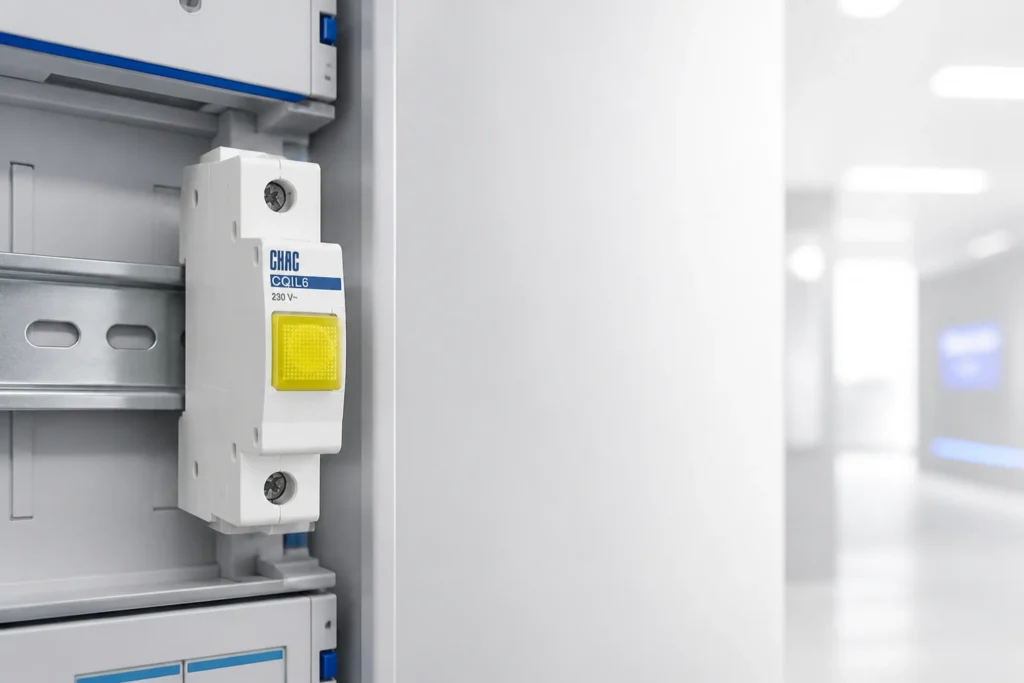
Use the published CQIL compact indicator light product route after the status map is defined, and keep the terminal-electrical category as family context. The product route is a sourcing starting point, not proof that one lens color or voltage option fits every panel.
Recomendación de producto
Luz indicadora compacta CQIL6(7) para montaje en panel | CHAC Electric

Utilice el publicado página de producto CHAC relevante as a documented product route starting point for a product discussion only after the RFQ inputs are complete. Private-label indicator packaging can be discussed on the página de personalización eléctrica de terminales. Matching lens color across brands is not proof of voltage interface, mounting geometry, or legend durability.
Part 7. Where does indicator-light selection stop and machine-safety begin?
This article supports early panel specification for status indication. It is not a machine-safety assessment, a wiring method for live work, or permission to omit selected-model installation instructions. Add a drawing review of legends against the IO list so operators do not invent lamp meanings on site.
Fit Boundary: indicator selection covers status-map RFQs; it is not a machine-safety function or interlock design.
Lectura relacionada: un artículo de CHAC más específico y ya publicado está enlazado por contexto, no como un sustituto del alcance de decisión de este artículo.
Send the status map and enclosure constraints via Contactar a CHAC Electric for an indicator product-route talk.
Preguntas frecuentes
Is a DIN-rail indicator light a protection device?
No. It is a status indication device unless the project design documents a different verified function.
Can color selection ignore the control drawing?
No. Color and legend must map to named statuses on the approved drawing or IO list.
What mounting details should buyers confirm?
Confirm rail or panel cut-out preference, enclosure depth, front access, and replacement constraints from the assembly drawing.
Which voltage information belongs in the RFQ?
State the control-circuit voltage and any interface constraints required by the selected indicator documentation.
Why request model documentation for a lamp?
Lens, voltage, terminals, and environmental limits are model-specific and should not be inferred from a category photo.
When should the final indicator schedule be frozen?
Freeze it after the status map and enclosure layout are approved, and before the panel bill of materials is released.